ReferentialSheet: Developer Cheatsheets for AWS, Docker, Kubernetes
Quick gut check: when was the last time you Googled a command you have used a hundred times before? Not something new — something you know you have run before, correctly, more than once. Maybe it was the kubectl flag that filters pods by status. Maybe it was the exact find incantation that excludes node_modules without also excluding everything else. Maybe it was an AWS CLI subcommand you are positive you typed in this exact project, six months ago.
If that sounds familiar, the problem was never that you didn't know the command. It's that you knew it was somewhere — in a half-remembered shell alias, a Slack message to yourself, a browser tab you've kept open since March, or a notes app entry buried under forty other entries titled "misc." None of that is searchable in a way that actually helps at 4:58 PM when you just need the pods to list correctly.
That's the exact problem ReferentialSheet is built to solve, and it's worth a look if any of the above sounds like your Tuesday.
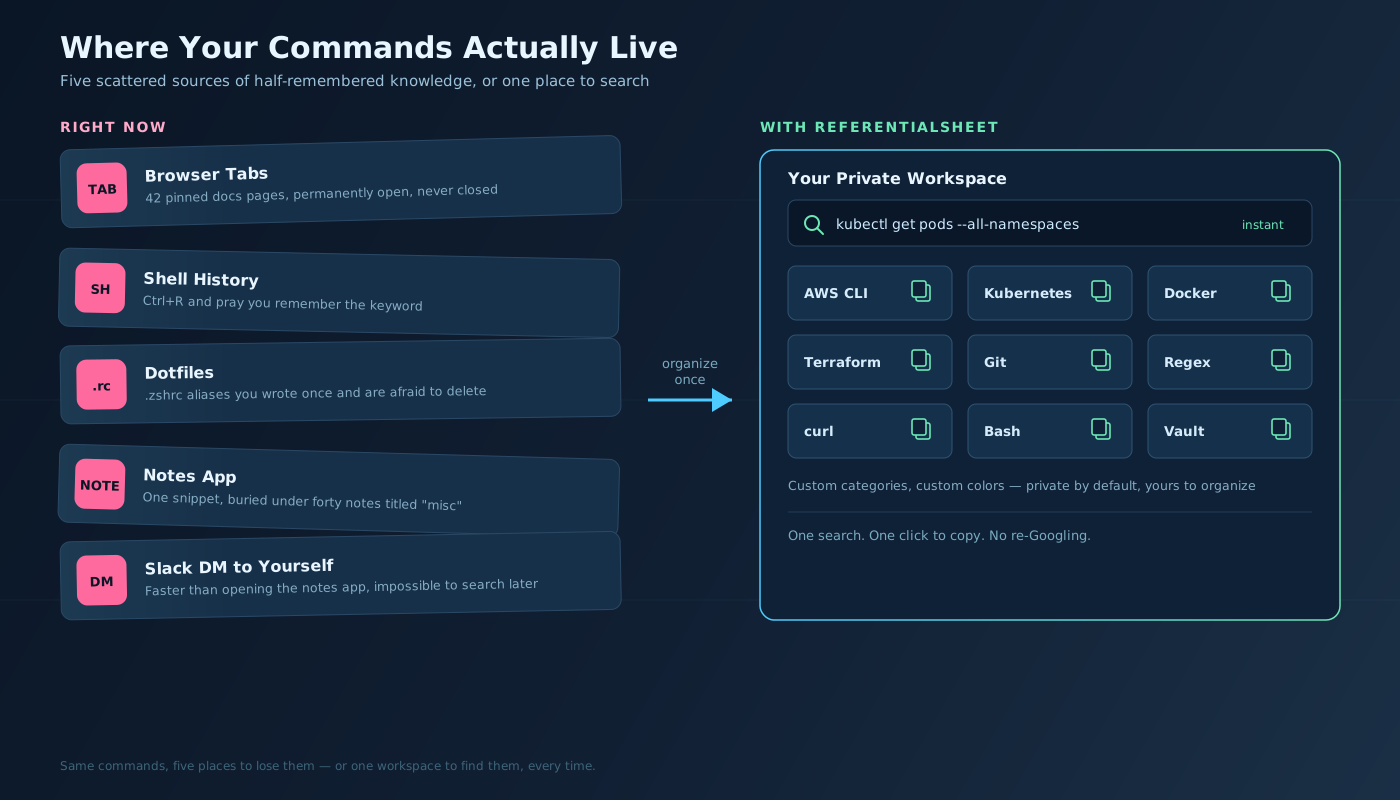
Where Your Commands Actually Live Right Now
Let's be honest about where command knowledge actually accumulates for most of us, because it's rarely in one place:
- Shell history — searchable with
Ctrl+R, if you remember roughly what you typed. Useless if you don't. - Dotfiles — a
.zshrcor.bashrcfull of aliases you wrote for a reason you no longer remember, next to three you're too afraid to delete. - Browser tabs — the official docs page for a tool, pinned, forever, because closing it means re-finding it later.
- A notes app — Apple Notes, Notion, a stray
TODO.md, wherever you dumped the one snippet that worked. - Messages to yourself — a Slack DM or a text to your own number, because that was faster than opening the notes app.
None of these is a bad idea on its own. The problem is running all five at once, with no single place to search across them and no consistency in how anything's labeled. You don't have a command-reference problem. You have a fragmentation problem.
What ReferentialSheet Actually Does
ReferentialSheet is two things stitched together, and both halves matter.
The first half is a personal command-reference manager. You create your own categories — name them whatever makes sense to you, pick a color and an icon for each one — and drop in the commands, snippets, and one-liners you actually use. Every entry gets a one-click copy button, so there's no more select-drag-copy dance in a terminal at 2 AM. Your workspace is private by default — nobody sees it but you.
The second half is a library of 54 curated public cheatsheets that ship with the product. You don't have to build your reference from zero — you start from a real, maintained baseline and layer your own private categories on top of it.
A few details worth knowing before you sign up:
- It's SQLite-backed, so search is instant. Type a partial command or a keyword and results appear as you type — no spinner, no "searching..." state.
- Snippets carry syntax labeling for Bash, Python, SQL, YAML, HCL, and more, so a Terraform block and a shell one-liner don't blur together.
- The account is free. There's no pricing wall blocking you from organizing your own commands — you sign up, you get a private workspace, you start adding.
54 Cheatsheets, Organized the Way You'd Actually Go Looking
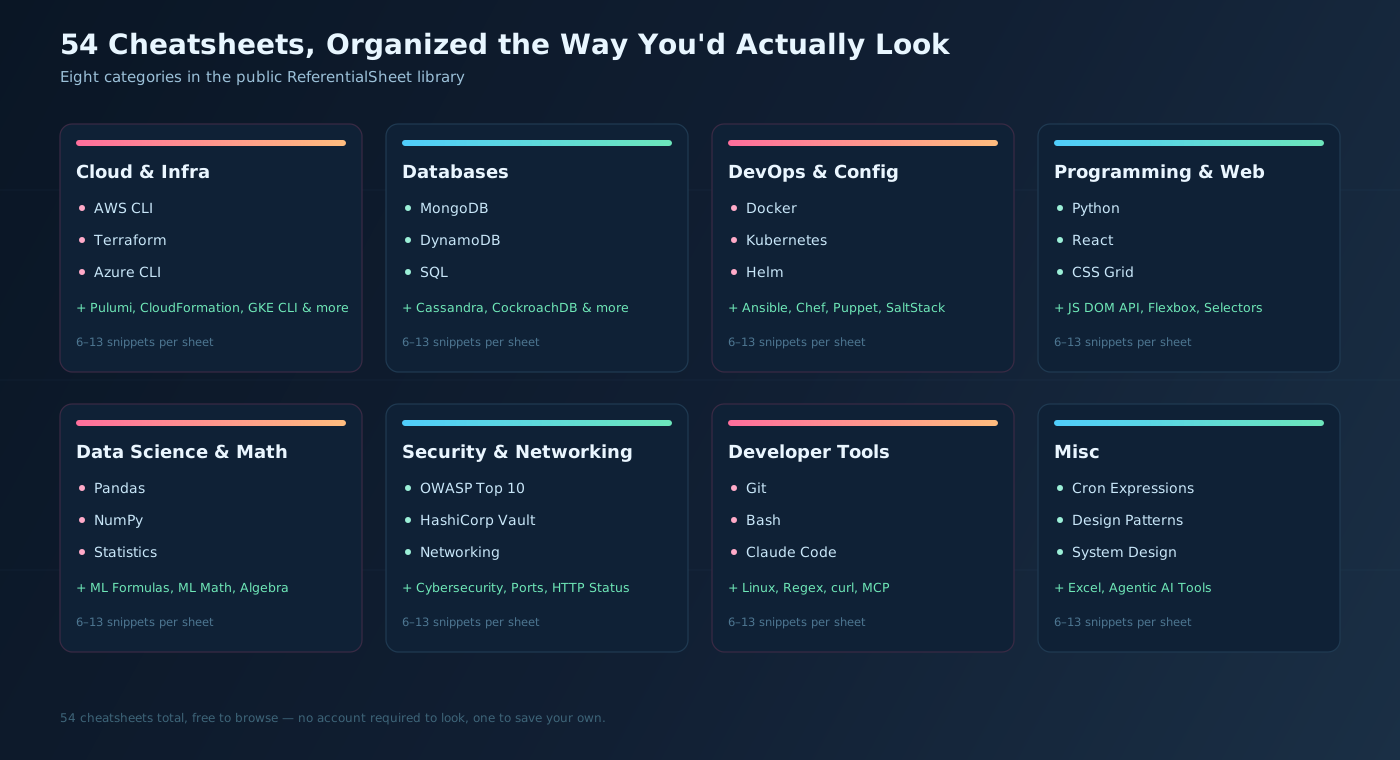
The public library holds 54 cheatsheets, each carrying somewhere between six and thirteen snippets — deep enough to be genuinely useful, not so deep that a single sheet becomes its own scavenger hunt. They're grouped into categories that map to how you actually think about your stack, not an alphabetical dump. Browse the Explore page and you'll find groups like:
- Cloud & Infra — including AWS CLI, AWS Secrets Manager, Azure CLI, CloudFormation, GKE CLI, Terraform, and Pulumi
- Databases — including Cassandra, CockroachDB, DynamoDB, MongoDB, and SQL
- DevOps & Config — including Ansible, Chef, Docker, Helm, Kubernetes, Puppet, and SaltStack
- Programming & Web — including Python, the JavaScript DOM API, React, CSS Flexbox, CSS Grid, and CSS Selectors
- Data Science & Math — including Pandas, NumPy, ML Formulas, ML Math, Statistics, and Algebra
- Security & Networking — including Cybersecurity, HashiCorp Vault, OWASP Top 10, Common Ports, Networking, and HTTP Status Codes
- Developer Tools — including Claude Code, Git, Bash, Linux, Regex, curl, and MCP (Model Context Protocol)
- Misc — including Cron Expressions, Design Patterns, System Design, Excel, and Agentic AI Tools
The Kind of Command You Always Forget
Here's the category of command ReferentialSheet is actually for — the one you can write from memory maybe 70% correctly, which in a terminal is functionally the same as 0% correctly:
kubectl get pods --all-namespaces -o json \
  | jq -r '.items[] | select(.status.phase!="Running") | "\(.metadata.namespace)/\(.metadata.name) — \(.status.phase)"'
That finds every pod across every namespace that isn't in a Running state — exactly the query you want when something's on fire and you don't have time to reconstruct jq filter syntax from scratch. Or the AWS equivalent:
aws ec2 describe-instances \
  --filters "Name=instance-state-name,Values=running" \
  --query "Reservations[].Instances[].[InstanceId,Tags[?Key=='Name'].Value|[0]]" \
  --output table
Neither is hard once you've written it — but you won't reliably recall the flag order, the jq selector, or AWS's --query shape six weeks from now, under pressure. That's exactly the snippet you drop into a private category — "Kubernetes: Debugging," "AWS: EC2" — with a one-click copy button waiting for next time.
What It's Missing, and Why That's Fine
One gap worth naming up front: ReferentialSheet's public library doesn't currently include LangChain or LangGraph cheatsheets. If you're deep in agent-framework work, keep using this blog's own LangChain Cheatsheet and LangGraph Cheatsheet for that layer of your stack — they aren't going anywhere.
What ReferentialSheet is genuinely strong on is the layer underneath your application code: cloud CLIs, infrastructure tools, databases, security references, and the general-purpose commands (Git, Bash, Linux, regex, curl) every project needs regardless of which framework sits on top. I publish cheatsheets on this blog myself — Python, Pandas, NumPy, Terraform, Scikit-learn, and the essential ML models reference among them — because I believe in the format. ReferentialSheet is where that same idea becomes an actual product: searchable, one-click copyable, and extensible with your own private sheets. It's the same principle behind why an MCP server is useful — structured, retrievable context beats a wall of prose, whether you're handing it to an agent or just to yourself next month.
Try It
You don't need to migrate your entire dotfiles collection on day one. Start smaller: pick the five commands you look up most often — the ones living in a pinned browser tab right now — and put them in one ReferentialSheet category. Then browse the Explore page for the public cheatsheets covering the rest of your stack.
Sign-up is free, your workspace is private by default, and the whole point is that the next time you need that command, it's one search and one click away instead of a re-Google. Try ReferentialSheet and see if your open-tab count goes down.
Related Posts
- LangChain Cheatsheet: The Complete Reference — The agent-framework reference ReferentialSheet's public library doesn't cover yet.
- LangGraph Cheatsheet: The Complete Reference — Same story, for stateful multi-agent graphs.
- Terraform Cheatsheet: The Complete Reference — The kind of infra reference that pairs naturally with ReferentialSheet's Cloud & Infra category.
- Python Cheatsheet: Everything You Need in One Place — Another reference living on this blog instead of in the app.
- Why Would I Use an MCP Server? — Structured, retrievable context for your agent; a cheatsheet is the same idea for you.