This is a reference, not a tutorial. Find the pattern you need, copy it, move on.
Table of Contents
- CLI Commands
- File Structure
- Providers
- Resources
- Variables
- Outputs
- Locals
- Data Sources
- Modules
- State
- Workspaces
- Built-in Functions
- Dynamic Blocks & Meta-Arguments
- Common Gotchas
CLI Commands
# Init & plan
terraform init                        # download providers, initialize backend
terraform init -upgrade               # upgrade provider versions
terraform validate                    # check syntax and config validity
terraform fmt                         # format all .tf files in place
terraform fmt -recursive              # format subdirectories too
terraform plan                        # preview changes
terraform plan -out=tfplan            # save plan to file
terraform plan -var="env=prod"        # pass variable inline
terraform plan -var-file="prod.tfvars"

# Apply & destroy
terraform apply                       # apply (prompts for confirmation)
terraform apply -auto-approve         # skip confirmation
terraform apply tfplan                # apply a saved plan
terraform destroy                     # destroy all resources
terraform destroy -target=aws_s3_bucket.my_bucket  # destroy one resource

# State inspection
terraform show                        # print current state
terraform show tfplan                 # print saved plan
terraform state list                  # list all resources in state
terraform state show aws_instance.web # show one resource's state
terraform output                      # print all outputs
terraform output instance_ip          # print one output

# State surgery (use carefully)
terraform state mv aws_instance.old aws_instance.new   # rename in state
terraform state rm aws_s3_bucket.temp                  # remove from state (does not delete resource)
terraform import aws_s3_bucket.my_bucket my-bucket-name # import existing resource

# Workspace
terraform workspace list
terraform workspace new staging
terraform workspace select prod
terraform workspace delete staging

# Graph
terraform graph | dot -Tsvg > graph.svg   # visualize dependency graph
File Structure
project/
├── main.tf          # resources
├── variables.tf     # input variable declarations
├── outputs.tf       # output declarations
├── providers.tf     # provider configuration
├── versions.tf      # required_providers + terraform block
├── locals.tf        # local values
├── terraform.tfvars # variable values (gitignore if secrets)
└── modules/
    └── vpc/
        ├── main.tf
        ├── variables.tf
        └── outputs.tf
Keep one resource type per file for large projects. Split by concern, not by file count.
Providers
# versions.tf
terraform {
  required_version = ">= 1.6.0"

  required_providers {
    aws = {
      source  = "hashicorp/aws"
      version = "~> 5.0"
    }
    random = {
      source  = "hashicorp/random"
      version = "~> 3.5"
    }
  }

  # Remote backend (S3 example)
  backend "s3" {
    bucket         = "my-tf-state"
    key            = "prod/terraform.tfstate"
    region         = "us-east-1"
    dynamodb_table = "tf-state-lock"
    encrypt        = true
  }
}

# providers.tf
provider "aws" {
  region  = var.aws_region
  profile = "my-aws-profile"

  default_tags {
    tags = {
      Project     = "my-app"
      Environment = var.environment
      ManagedBy   = "terraform"
    }
  }
}

# Multiple provider aliases (multi-region)
provider "aws" {
  alias  = "us_west"
  region = "us-west-2"
}
Resources
# Basic resource
resource "aws_s3_bucket" "assets" {
  bucket = "my-app-assets-${var.environment}"

  tags = {
    Name = "App Assets"
  }
}

# Reference another resource's attribute
resource "aws_s3_bucket_versioning" "assets" {
  bucket = aws_s3_bucket.assets.id   # implicit dependency

  versioning_configuration {
    status = "Enabled"
  }
}

# Explicit dependency (when implicit is not enough)
resource "aws_instance" "web" {
  ami           = "ami-0c55b159cbfafe1f0"
  instance_type = "t3.micro"

  depends_on = [aws_iam_role_policy.web_policy]
}

# Use alternate provider
resource "aws_s3_bucket" "west_backup" {
  provider = aws.us_west
  bucket   = "my-app-backup-west"
}
Resource lifecycle
resource "aws_instance" "web" {
  ami           = var.ami_id
  instance_type = "t3.micro"

  lifecycle {
    create_before_destroy = true   # spin up replacement before killing old one
    prevent_destroy       = true   # block terraform destroy on this resource
    ignore_changes        = [tags, user_data]  # don't drift-detect these fields
  }
}
Variables
# variables.tf — declarations
variable "environment" {
  type        = string
  description = "Deployment environment (dev, staging, prod)"
  default     = "dev"

  validation {
    condition     = contains(["dev", "staging", "prod"], var.environment)
    error_message = "environment must be dev, staging, or prod."
  }
}

variable "instance_count" {
  type    = number
  default = 1
}

variable "enable_monitoring" {
  type    = bool
  default = false
}

variable "allowed_cidrs" {
  type    = list(string)
  default = ["10.0.0.0/8"]
}

variable "tags" {
  type    = map(string)
  default = {}
}

variable "db_config" {
  type = object({
    engine  = string
    version = string
    size    = string
  })
  default = {
    engine  = "postgres"
    version = "15"
    size    = "db.t3.micro"
  }
}

variable "db_password" {
  type      = string
  sensitive = true   # masked in plan output and logs
}
Passing variable values
# 1. terraform.tfvars (auto-loaded)
environment    = "prod"
instance_count = 3
db_password    = "s3cr3t"

# 2. Named .tfvars file
terraform apply -var-file="prod.tfvars"

# 3. CLI flag
terraform apply -var="environment=prod" -var="instance_count=3"

# 4. Environment variable (TF_VAR_ prefix)
export TF_VAR_environment=prod
export TF_VAR_db_password=s3cr3t
Outputs
# outputs.tf
output "bucket_name" {
  value       = aws_s3_bucket.assets.bucket
  description = "Name of the S3 assets bucket"
}

output "instance_public_ip" {
  value = aws_instance.web.public_ip
}

output "db_endpoint" {
  value     = aws_db_instance.main.endpoint
  sensitive = true   # masked in CLI output, available to other modules
}

# Output a map
output "subnet_ids" {
  value = { for k, v in aws_subnet.private : k => v.id }
}
terraform output                     # all outputs
terraform output -json               # JSON (pipe into scripts)
terraform output instance_public_ip  # single value
Locals
# locals.tf
locals {
  name_prefix = "${var.project}-${var.environment}"
  common_tags = merge(var.tags, {
    Project     = var.project
    Environment = var.environment
    ManagedBy   = "terraform"
  })
  azs         = slice(data.aws_availability_zones.available.names, 0, 3)
  is_prod     = var.environment == "prod"
}

# Use locals anywhere
resource "aws_s3_bucket" "logs" {
  bucket = "${local.name_prefix}-logs"
  tags   = local.common_tags
}
Data Sources
Read existing infrastructure without managing it.
# Fetch the latest Amazon Linux 2023 AMI
data "aws_ami" "amazon_linux" {
  most_recent = true
  owners      = ["amazon"]

  filter {
    name   = "name"
    values = ["al2023-ami-*-x86_64"]
  }
}

# Fetch an existing VPC by tag
data "aws_vpc" "main" {
  tags = { Name = "main-vpc" }
}

# Fetch all availability zones in the current region
data "aws_availability_zones" "available" {
  state = "available"
}

# Fetch current AWS account ID / region
data "aws_caller_identity" "current" {}
data "aws_region" "current" {}

# Use data sources
resource "aws_instance" "web" {
  ami           = data.aws_ami.amazon_linux.id
  instance_type = "t3.micro"
  subnet_id     = data.aws_vpc.main.id
}

output "account_id" {
  value = data.aws_caller_identity.current.account_id
}
Modules
Calling a module
module "vpc" {
  source  = "terraform-aws-modules/vpc/aws"
  version = "~> 5.0"

  name = local.name_prefix
  cidr = "10.0.0.0/16"

  azs             = local.azs
  private_subnets = ["10.0.1.0/24", "10.0.2.0/24", "10.0.3.0/24"]
  public_subnets  = ["10.0.101.0/24", "10.0.102.0/24", "10.0.103.0/24"]

  enable_nat_gateway = true
  single_nat_gateway = !local.is_prod
}

# Reference module outputs
resource "aws_instance" "web" {
  subnet_id = module.vpc.private_subnets[0]
}
Local module
module "rds" {
  source = "./modules/rds"

  name        = local.name_prefix
  vpc_id      = module.vpc.vpc_id
  subnet_ids  = module.vpc.private_subnets
  db_password = var.db_password
}
Writing a module
# modules/rds/variables.tf
variable "name"        { type = string }
variable "vpc_id"      { type = string }
variable "subnet_ids"  { type = list(string) }
variable "db_password" { type = string; sensitive = true }

# modules/rds/main.tf
resource "aws_db_subnet_group" "this" {
  name       = "${var.name}-db"
  subnet_ids = var.subnet_ids
}

resource "aws_db_instance" "this" {
  identifier        = var.name
  engine            = "postgres"
  engine_version    = "15"
  instance_class    = "db.t3.micro"
  allocated_storage = 20
  db_name           = "appdb"
  username          = "admin"
  password          = var.db_password
  db_subnet_group_name = aws_db_subnet_group.this.name
  skip_final_snapshot  = true
}

# modules/rds/outputs.tf
output "endpoint" {
  value     = aws_db_instance.this.endpoint
  sensitive = true
}
State
Remote backend (S3 + DynamoDB lock)
terraform {
  backend "s3" {
    bucket         = "my-tf-state-bucket"
    key            = "infra/terraform.tfstate"
    region         = "us-east-1"
    dynamodb_table = "tf-state-lock"   # prevents concurrent applies
    encrypt        = true
  }
}
# Bootstrap the S3 bucket and DynamoDB table before using this backend
aws s3api create-bucket --bucket my-tf-state-bucket --region us-east-1
aws s3api put-bucket-versioning --bucket my-tf-state-bucket \
  --versioning-configuration Status=Enabled
aws dynamodb create-table \
  --table-name tf-state-lock \
  --attribute-definitions AttributeName=LockID,AttributeType=S \
  --key-schema AttributeName=LockID,KeyType=HASH \
  --billing-mode PAY_PER_REQUEST
State commands
terraform state list                            # list all tracked resources
terraform state show aws_s3_bucket.assets       # inspect one resource
terraform state mv old_resource new_resource    # rename (after refactoring)
terraform state rm aws_instance.old            # stop tracking (does not delete)
terraform import aws_s3_bucket.existing my-bucket  # bring existing resource under management

# Pull / push state manually (rarely needed)
terraform state pull > state.json
terraform state push state.json
Workspaces
Workspaces store separate state files for the same config. Useful for environment isolation without duplicating code.
terraform workspace list          # default
terraform workspace new staging
terraform workspace new prod
terraform workspace select prod
terraform workspace show          # current workspace name
terraform workspace delete staging
# Use workspace name in config
resource "aws_s3_bucket" "data" {
  bucket = "my-app-${terraform.workspace}-data"
}

locals {
  instance_type = terraform.workspace == "prod" ? "t3.large" : "t3.micro"
}
Workspaces share the same backend bucket — state files are stored under
env://<workspace>/. Use separate backend configs (different S3 keys or accounts) for strict environment isolation.
Built-in Functions
# String
local.name_prefix = lower("My-App")           # "my-app"
format("%s-%s", var.project, var.env)          # "myapp-prod"
replace("hello world", " ", "-")              # "hello-world"
split(",", "a,b,c")                           # ["a","b","c"]
join("-", ["a","b","c"])                      # "a-b-c"
trimspace("  hello  ")                        # "hello"
startswith("hello", "hel")                    # true

# Collection
length(var.allowed_cidrs)                     # number of items
merge(var.tags, local.common_tags)            # merge maps
concat(list1, list2)                          # merge lists
flatten([[1,2],[3,4]])                         # [1,2,3,4]
distinct(["a","b","a"])                        # ["a","b"]
keys({ a = 1, b = 2 })                        # ["a","b"]
values({ a = 1, b = 2 })                      # [1,2]
lookup(var.tags, "env", "unknown")            # safe map access with default
contains(["dev","prod"], var.environment)     # true/false
toset(["a","b","a"])                          # {"a","b"}
zipmap(["a","b"], [1,2])                      # {a=1, b=2}

# Numeric
max(1, 5, 3)                                  # 5
min(1, 5, 3)                                  # 1
ceil(1.2)                                     # 2
floor(1.9)                                    # 1

# Encoding
base64encode("hello")                         # "aGVsbG8="
base64decode("aGVsbG8=")                      # "hello"
jsonencode({ key = "value" })                 # "{\"key\":\"value\"}"
jsondecode("{\"key\":\"value\"}")             # { key = "value" }

# Filesystem (evaluated at plan time)
file("./scripts/init.sh")                     # read file contents
templatefile("./templates/user_data.tpl", { name = var.name })
filebase64("./certs/ca.crt")                  # base64-encoded file content

# Type conversion
tostring(42)                                  # "42"
tonumber("42")                                # 42
tobool("true")                                # true
Dynamic Blocks & Meta-Arguments
count — create N copies
resource "aws_instance" "web" {
  count         = var.instance_count
  ami           = data.aws_ami.amazon_linux.id
  instance_type = "t3.micro"

  tags = { Name = "web-${count.index}" }
}

# Reference: aws_instance.web[0], aws_instance.web[1], ...
output "web_ips" {
  value = aws_instance.web[*].public_ip
}
for_each — create one per map/set key (preferred over count)
variable "buckets" {
  default = {
    assets = "us-east-1"
    logs   = "us-west-2"
    backup = "eu-west-1"
  }
}

resource "aws_s3_bucket" "multi" {
  for_each = var.buckets
  bucket   = "my-app-${each.key}"
  # each.key = "assets", "logs", "backup"
  # each.value = "us-east-1", "us-west-2", "eu-west-1"
}

# Reference: aws_s3_bucket.multi["assets"].bucket
dynamic block — generate repeated nested blocks
variable "ingress_rules" {
  default = [
    { port = 80,  cidr = "0.0.0.0/0" },
    { port = 443, cidr = "0.0.0.0/0" },
    { port = 22,  cidr = "10.0.0.0/8" },
  ]
}

resource "aws_security_group" "web" {
  name   = "web-sg"
  vpc_id = module.vpc.vpc_id

  dynamic "ingress" {
    for_each = var.ingress_rules
    content {
      from_port   = ingress.value.port
      to_port     = ingress.value.port
      protocol    = "tcp"
      cidr_blocks = [ingress.value.cidr]
    }
  }

  egress {
    from_port   = 0
    to_port     = 0
    protocol    = "-1"
    cidr_blocks = ["0.0.0.0/0"]
  }
}
for expressions
# List comprehension
locals {
  upper_names = [for name in var.names : upper(name)]
  long_names  = [for name in var.names : name if length(name) > 5]
}

# Map comprehension
locals {
  bucket_arns = { for k, v in aws_s3_bucket.multi : k => v.arn }
}

# Convert list to map (for_each-friendly)
locals {
  users_map = { for u in var.users : u.name => u }
}
Common Gotchas
1. count vs for_each — use for_each for anything with identity.
count indexes by position. Remove item 0 from a list and everything shifts — Terraform destroys and recreates items 1, 2, 3. for_each indexes by key. Remove one key and only that resource is destroyed. Use count only for truly identical, interchangeable resources.
2. terraform plan does not lock state.
Only terraform apply acquires the DynamoDB lock. Two engineers can run plan simultaneously without issue. Running apply simultaneously — even with a lock table — will have the second apply fail with a lock error. That is the correct behavior, not a bug.
3. Sensitive values leak through outputs if not marked.
Mark any output containing a secret as sensitive = true. Without it, the value prints in plain text during apply and is stored unmasked in state. State is always plaintext — encrypt the S3 bucket and restrict access regardless.
4. terraform import does not generate config.
import brings a resource into state, but the .tf config block must already exist and match. Run terraform plan after import — if the config does not match the imported resource, plan will show a diff and apply will modify or recreate it.
5. Provider version constraints: use ~> not >=.
>= 5.0 allows any future major version, including breaking changes. ~> 5.0 allows 5.x only. ~> 5.31 allows 5.31.x only. Lock to the minor version in production.
6. Module source changes always require terraform init.
Changing a module source URL, version, or local path is not picked up by plan until you run init again. The plan will use the cached version and silently apply the wrong code.
Image
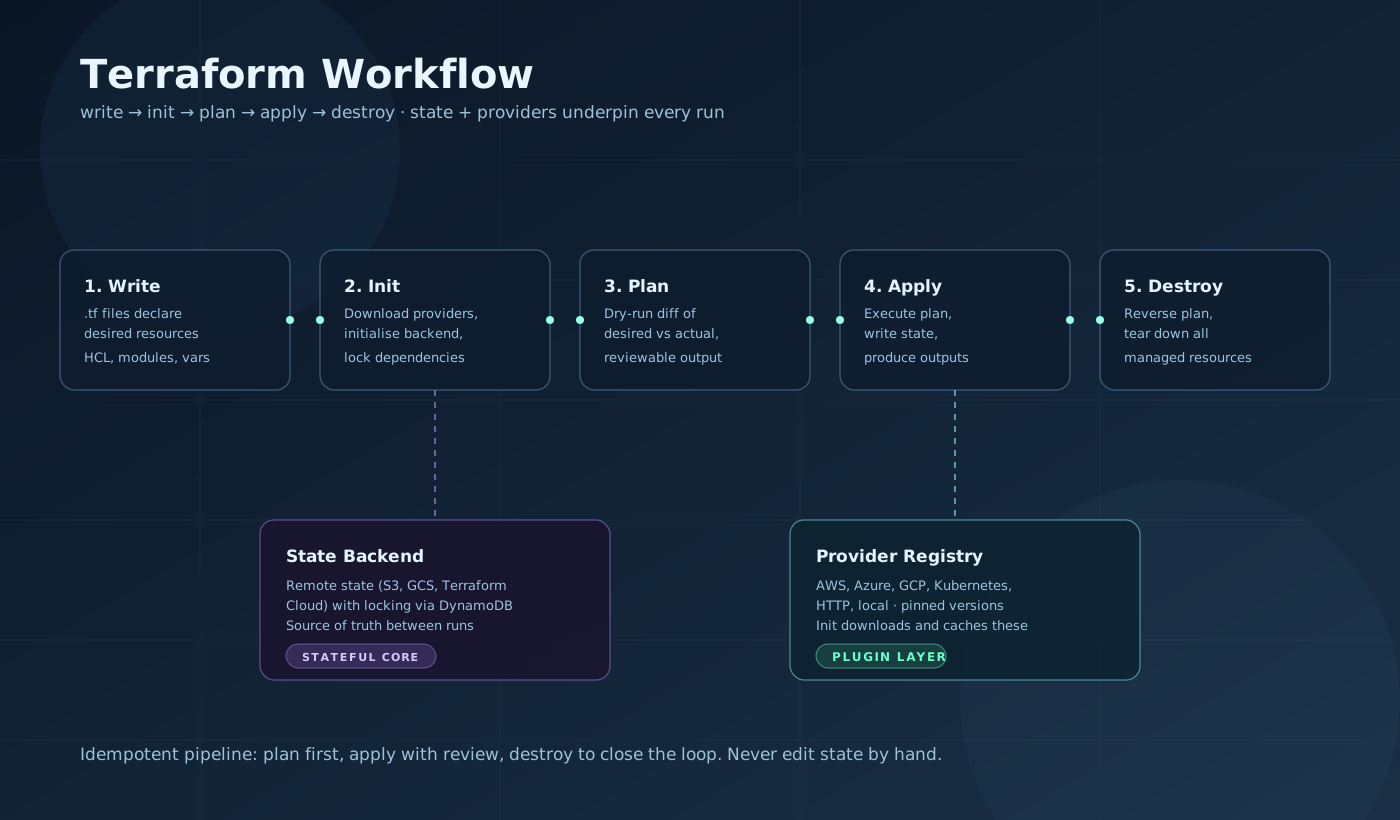
Terraform workflow. Write declares resources in HCL. init downloads providers and configures the backend. plan computes the diff between config and state. apply executes the diff and saves new state. State lives in the remote backend (S3 + DynamoDB lock). Providers translate HCL resources into API calls against AWS, GCP, Azure, or any other platform.
Key Takeaways
for_eachovercountfor anything with identity. Count-indexed resources shift on deletion. Key-indexed resources don't. Switching fromcounttofor_eachafter deployment requires state surgery.- State is the source of truth — treat it like a database. Use remote backends with encryption and locking from day one. Never edit state manually. Use
state mv,state rm, andimportfor surgery. sensitive = truedoes not encrypt state. It masks values in terminal output only. The S3 bucket holding state must be encrypted and access-controlled independently.- Modules are the unit of reuse. Extract anything you deploy more than once. Keep module interfaces narrow — fewer variables, well-typed, with validation. Use the Terraform Registry for proven community modules before writing your own.
Related Posts
- Terraform + MCP + AI Agents: The New Infrastructure Stack — Combining Terraform with AI agents and MCP for automated infrastructure management.
- MCP Cheatsheet — Building MCP servers that expose Terraform operations as agent-callable tools.
- AI Coding Agents Cheatsheet — Agent patterns for automating infrastructure workflows.
Hit a gotcha not on this list? Drop it in the comments.