This is a reference, not a tutorial. Find the pattern you need, copy it, move on.
Table of Contents
- Installation & Setup
- LLMs & Chat Models
- Prompt Templates
- LCEL — LangChain Expression Language
- Chains
- Memory
- Document Loaders & Text Splitters
- Embeddings & Vector Stores
- Retrievers & RAG
- Tools & Agents
- Output Parsers
- Common Gotchas
Installation & Setup
pip install langchain langchain-openai langchain-anthropic langchain-community chromadb faiss-cpu
import os
os.environ["OPENAI_API_KEY"] = "sk-..."
os.environ["ANTHROPIC_API_KEY"] = "sk-ant-..."
LLMs & Chat Models
from langchain_openai import ChatOpenAI
from langchain_anthropic import ChatAnthropic
from langchain_core.messages import HumanMessage, SystemMessage, AIMessage

# OpenAI
llm = ChatOpenAI(model="gpt-4o", temperature=0)

# Anthropic
llm = ChatAnthropic(model="claude-sonnet-4-6", temperature=0)

# Single call
response = llm.invoke("What is 2 + 2?")
print(response.content)  # "4"

# With message list
messages = [
    SystemMessage(content="You are a helpful assistant."),
    HumanMessage(content="Explain recursion in one sentence."),
]
response = llm.invoke(messages)
print(response.content)

# Streaming
for chunk in llm.stream("Count from 1 to 5"):
    print(chunk.content, end="", flush=True)

# Async
import asyncio
response = asyncio.run(llm.ainvoke("Hello"))
Prompt Templates
from langchain_core.prompts import (
    ChatPromptTemplate,
    PromptTemplate,
    MessagesPlaceholder,
)

# Basic chat prompt
prompt = ChatPromptTemplate.from_messages([
    ("system", "You are an expert in {domain}."),
    ("human", "{question}"),
])

# Format and inspect
formatted = prompt.format_messages(domain="Python", question="What is a decorator?")

# With message history placeholder (for memory)
prompt_with_history = ChatPromptTemplate.from_messages([
    ("system", "You are a helpful assistant."),
    MessagesPlaceholder(variable_name="history"),
    ("human", "{input}"),
])

# Simple string prompt
template = PromptTemplate.from_template("Summarize this in {n} words: {text}")
LCEL — LangChain Expression Language
LCEL is the pipe operator (|) that chains runnables. Every component in LangChain is a Runnable.
from langchain_openai import ChatOpenAI
from langchain_core.prompts import ChatPromptTemplate
from langchain_core.output_parsers import StrOutputParser

llm = ChatOpenAI(model="gpt-4o")
parser = StrOutputParser()

# Build a chain with |
chain = (
    ChatPromptTemplate.from_template("Tell me a fact about {topic}.")
    | llm
    | parser
)

result = chain.invoke({"topic": "black holes"})
print(result)  # plain string output

# Streaming through LCEL chain
for chunk in chain.stream({"topic": "quantum physics"}):
    print(chunk, end="", flush=True)

# Batch — run multiple inputs in parallel
results = chain.batch([{"topic": "Mars"}, {"topic": "DNA"}, {"topic": "origami"}])

# Async
import asyncio
result = asyncio.run(chain.ainvoke({"topic": "jazz"}))
Branching with RunnableParallel
from langchain_core.runnables import RunnableParallel, RunnablePassthrough

# Run two chains in parallel, merge results
parallel = RunnableParallel(
    pros=ChatPromptTemplate.from_template("List 3 pros of {topic}.") | llm | parser,
    cons=ChatPromptTemplate.from_template("List 3 cons of {topic}.") | llm | parser,
)

result = parallel.invoke({"topic": "remote work"})
print(result["pros"])
print(result["cons"])

# Pass input through unchanged alongside transformations
chain = RunnableParallel(
    answer=ChatPromptTemplate.from_template("Answer: {question}") | llm | parser,
    original_question=RunnablePassthrough(),
)
RunnableLambda — wrap any function
from langchain_core.runnables import RunnableLambda

def shout(text: str) -> str:
    return text.upper()

chain = (
    ChatPromptTemplate.from_template("Say hello to {name}.")
    | llm
    | parser
    | RunnableLambda(shout)
)

print(chain.invoke({"name": "Alice"}))  # "HELLO, ALICE!"
Chains
LLMChain (legacy) vs LCEL
# Modern LCEL way (preferred)
from langchain_core.prompts import ChatPromptTemplate
from langchain_core.output_parsers import StrOutputParser
from langchain_openai import ChatOpenAI

chain = (
    ChatPromptTemplate.from_template("Translate to French: {text}")
    | ChatOpenAI(model="gpt-4o")
    | StrOutputParser()
)
print(chain.invoke({"text": "Hello, world!"}))
Sequential chain
# Step 1: generate a topic outline
outline_chain = (
    ChatPromptTemplate.from_template("Create a 3-point outline for a blog post about {topic}.")
    | llm
    | parser
)

# Step 2: write the post from the outline
post_chain = (
    ChatPromptTemplate.from_template("Write a short blog post based on this outline:\n{outline}")
    | llm
    | parser
)

# Compose them
full_chain = {"outline": outline_chain} | RunnablePassthrough.assign(post=post_chain)
result = full_chain.invoke({"topic": "AI agents"})
print(result["post"])
Fallback chains
from langchain_anthropic import ChatAnthropic

primary = ChatOpenAI(model="gpt-4o")
fallback = ChatAnthropic(model="claude-sonnet-4-6")

# Falls back to Claude if GPT-4o raises an exception
robust_llm = primary.with_fallbacks([fallback])
chain = ChatPromptTemplate.from_template("Answer: {q}") | robust_llm | parser
Memory
In-memory conversation history (LCEL)
from langchain_core.chat_history import InMemoryChatMessageHistory
from langchain_core.runnables.history import RunnableWithMessageHistory

llm = ChatOpenAI(model="gpt-4o")
store: dict[str, InMemoryChatMessageHistory] = {}

def get_session_history(session_id: str) -> InMemoryChatMessageHistory:
    if session_id not in store:
        store[session_id] = InMemoryChatMessageHistory()
    return store[session_id]

prompt = ChatPromptTemplate.from_messages([
    ("system", "You are a helpful assistant."),
    MessagesPlaceholder(variable_name="history"),
    ("human", "{input}"),
])

chain = prompt | llm | parser

chain_with_memory = RunnableWithMessageHistory(
    chain,
    get_session_history,
    input_messages_key="input",
    history_messages_key="history",
)

# Same session_id = shared history
chain_with_memory.invoke(
    {"input": "My name is Alice."},
    config={"configurable": {"session_id": "user-1"}},
)
response = chain_with_memory.invoke(
    {"input": "What is my name?"},
    config={"configurable": {"session_id": "user-1"}},
)
print(response)  # "Your name is Alice."
Document Loaders & Text Splitters
from langchain_community.document_loaders import (
    TextLoader,
    PyPDFLoader,
    WebBaseLoader,
    DirectoryLoader,
    CSVLoader,
)
from langchain_text_splitters import RecursiveCharacterTextSplitter

# Load from file
loader = TextLoader("notes.txt")
docs = loader.load()  # list of Document objects

# Load PDF
loader = PyPDFLoader("report.pdf")
pages = loader.load_and_split()

# Load from URL
loader = WebBaseLoader("https://example.com/article")
docs = loader.load()

# Load all .md files in a directory
loader = DirectoryLoader("./docs", glob="**/*.md", loader_cls=TextLoader)
docs = loader.load()

# Split into chunks
splitter = RecursiveCharacterTextSplitter(
    chunk_size=1000,      # characters per chunk
    chunk_overlap=200,    # overlap between chunks
    separators=["\n\n", "\n", ".", " ", ""],
)
chunks = splitter.split_documents(docs)

print(f"{len(docs)} docs → {len(chunks)} chunks")
print(chunks[0].page_content)
print(chunks[0].metadata)  # {"source": "notes.txt"}
Embeddings & Vector Stores
from langchain_openai import OpenAIEmbeddings
from langchain_community.vectorstores import FAISS, Chroma

embeddings = OpenAIEmbeddings(model="text-embedding-3-small")

# FAISS — in-memory, fast, no server needed
vectorstore = FAISS.from_documents(chunks, embeddings)
vectorstore.save_local("faiss_index")                       # persist
vectorstore = FAISS.load_local("faiss_index", embeddings, allow_dangerous_deserialization=True)

# Chroma — persistent local store
vectorstore = Chroma.from_documents(
    chunks,
    embeddings,
    persist_directory="./chroma_db",
)

# Similarity search
results = vectorstore.similarity_search("What is RAG?", k=4)
for doc in results:
    print(doc.page_content[:200])

# With scores
results = vectorstore.similarity_search_with_score("RAG", k=3)
for doc, score in results:
    print(f"score={score:.3f}  {doc.page_content[:100]}")

# Add new documents to existing store
vectorstore.add_documents(new_chunks)
Retrievers & RAG
from langchain_core.prompts import ChatPromptTemplate
from langchain_core.runnables import RunnablePassthrough
from langchain_core.output_parsers import StrOutputParser
from langchain_openai import ChatOpenAI, OpenAIEmbeddings
from langchain_community.vectorstores import FAISS

# Build retriever from vector store
retriever = vectorstore.as_retriever(
    search_type="similarity",   # or "mmr" for diversity
    search_kwargs={"k": 4},
)

# RAG chain
llm = ChatOpenAI(model="gpt-4o")
parser = StrOutputParser()

rag_prompt = ChatPromptTemplate.from_template("""
Answer the question based only on the context below.
If the answer is not in the context, say "I don't know."

Context:
{context}

Question: {question}
""")

def format_docs(docs):
    return "\n\n".join(doc.page_content for doc in docs)

rag_chain = (
    {"context": retriever | format_docs, "question": RunnablePassthrough()}
    | rag_prompt
    | llm
    | parser
)

answer = rag_chain.invoke("What is the main idea of the document?")
print(answer)
MultiQuery Retriever — more robust retrieval
from langchain.retrievers import MultiQueryRetriever

multi_retriever = MultiQueryRetriever.from_llm(
    retriever=vectorstore.as_retriever(),
    llm=llm,
)
# Generates 3 query variants, merges results, deduplicates
docs = multi_retriever.invoke("How does authentication work?")
Contextual Compression
from langchain.retrievers import ContextualCompressionRetriever
from langchain.retrievers.document_compressors import LLMChainExtractor

compressor = LLMChainExtractor.from_llm(llm)
compression_retriever = ContextualCompressionRetriever(
    base_compressor=compressor,
    base_retriever=retriever,
)
# Returns only relevant excerpts, not full chunks
docs = compression_retriever.invoke("What are the key risks?")
Tools & Agents
Define a custom tool
from langchain_core.tools import tool

@tool
def get_word_count(text: str) -> int:
    """Count the number of words in a text string."""
    return len(text.split())

@tool
def search_wikipedia(query: str) -> str:
    """Search Wikipedia and return a brief summary for the query."""
    import wikipedia
    try:
        return wikipedia.summary(query, sentences=3)
    except Exception as e:
        return f"Error: {e}"

# Tool metadata
print(get_word_count.name)         # "get_word_count"
print(get_word_count.description)  # docstring
print(get_word_count.args)         # input schema
Tool with structured input
from langchain_core.tools import tool
from pydantic import BaseModel, Field

class SearchInput(BaseModel):
    query: str = Field(description="Search query string")
    max_results: int = Field(default=5, description="Max results to return")

@tool(args_schema=SearchInput)
def web_search(query: str, max_results: int = 5) -> list[str]:
    """Search the web and return a list of result snippets."""
    # Replace with real search API call
    return [f"Result {i+1} for '{query}'" for i in range(max_results)]
ReAct Agent (tool-calling)
from langchain.agents import create_tool_calling_agent, AgentExecutor
from langchain_core.prompts import ChatPromptTemplate, MessagesPlaceholder

llm = ChatOpenAI(model="gpt-4o")
tools = [get_word_count, search_wikipedia]

prompt = ChatPromptTemplate.from_messages([
    ("system", "You are a helpful assistant. Use tools when needed."),
    ("human", "{input}"),
    MessagesPlaceholder(variable_name="agent_scratchpad"),
])

agent = create_tool_calling_agent(llm, tools, prompt)

executor = AgentExecutor(
    agent=agent,
    tools=tools,
    verbose=True,         # prints reasoning steps
    max_iterations=10,
    return_intermediate_steps=True,
)

result = executor.invoke({"input": "How many words are in 'the quick brown fox'?"})
print(result["output"])
LangGraph agent (preferred for complex flows)
from langgraph.prebuilt import create_react_agent
from langchain_openai import ChatOpenAI

llm = ChatOpenAI(model="gpt-4o")
tools = [get_word_count, search_wikipedia]

graph = create_react_agent(llm, tools)

result = graph.invoke({
    "messages": [("human", "Search Wikipedia for 'LangChain' and count the words in the first sentence.")]
})
print(result["messages"][-1].content)
Output Parsers
from langchain_core.output_parsers import (
    StrOutputParser,
    JsonOutputParser,
    CommaSeparatedListOutputParser,
)
from langchain_core.pydantic_v1 import BaseModel, Field

# String (default)
parser = StrOutputParser()
chain = llm | parser

# Comma-separated list
list_parser = CommaSeparatedListOutputParser()
chain = (
    ChatPromptTemplate.from_template("List 5 {category}, comma-separated.")
    | llm
    | list_parser
)
print(chain.invoke({"category": "Python libraries"}))  # ['numpy', 'pandas', ...]

# Structured JSON via Pydantic
class MovieReview(BaseModel):
    title: str = Field(description="Movie title")
    rating: float = Field(description="Rating from 0 to 10")
    summary: str = Field(description="One-sentence summary")

json_parser = JsonOutputParser(pydantic_object=MovieReview)

chain = (
    ChatPromptTemplate.from_messages([
        ("system", "Extract movie review info as JSON.\n{format_instructions}"),
        ("human", "{text}"),
    ]).partial(format_instructions=json_parser.get_format_instructions())
    | llm
    | json_parser
)

result = chain.invoke({"text": "Inception is a mind-bending thriller. I'd give it a 9.5."})
print(result)  # {"title": "Inception", "rating": 9.5, "summary": "..."}

# With structured output (cleaner — model-native)
structured_llm = llm.with_structured_output(MovieReview)
review = structured_llm.invoke("Interstellar is a visually stunning sci-fi epic. 9/10.")
print(review.title, review.rating)
Common Gotchas
1. invoke vs run vs predict — use invoke.
Old chain classes exposed .run() and .predict(). These are deprecated. Everything in LCEL uses .invoke(), .stream(), .batch(), and their async variants. If you see .run() in a code sample, it is outdated.
2. Document metadata survives chunking — use it.
TextSplitter.split_documents() preserves doc.metadata on every chunk. Store file paths, page numbers, and source URLs there. They come back with retrieval results and are essential for citations and debugging.
3. RunnableWithMessageHistory requires matching keys.
The input_messages_key and history_messages_key must exactly match the variable names in your prompt template. A mismatch silently passes empty history or raises a KeyError at runtime. Check both sides of the mapping.
4. FAISS allow_dangerous_deserialization=True is required for load_local.
LangChain added this flag to prevent pickle-based exploits. You must pass it explicitly when loading a local FAISS index. It is not dangerous if the index file is yours — but never load a FAISS index from an untrusted source.
5. verbose=True on AgentExecutor is your debugger.
When an agent behaves unexpectedly, turn on verbose=True. It prints each thought, tool call, and observation. Without it, debugging multi-step agent failures is guesswork.
6. LangGraph is the successor to AgentExecutor for complex agents.
AgentExecutor works fine for simple tool-calling loops. For branching logic, cycles, human-in-the-loop, or streaming intermediate steps, use LangGraph. The create_react_agent import from langgraph.prebuilt is a drop-in starting point.
Image
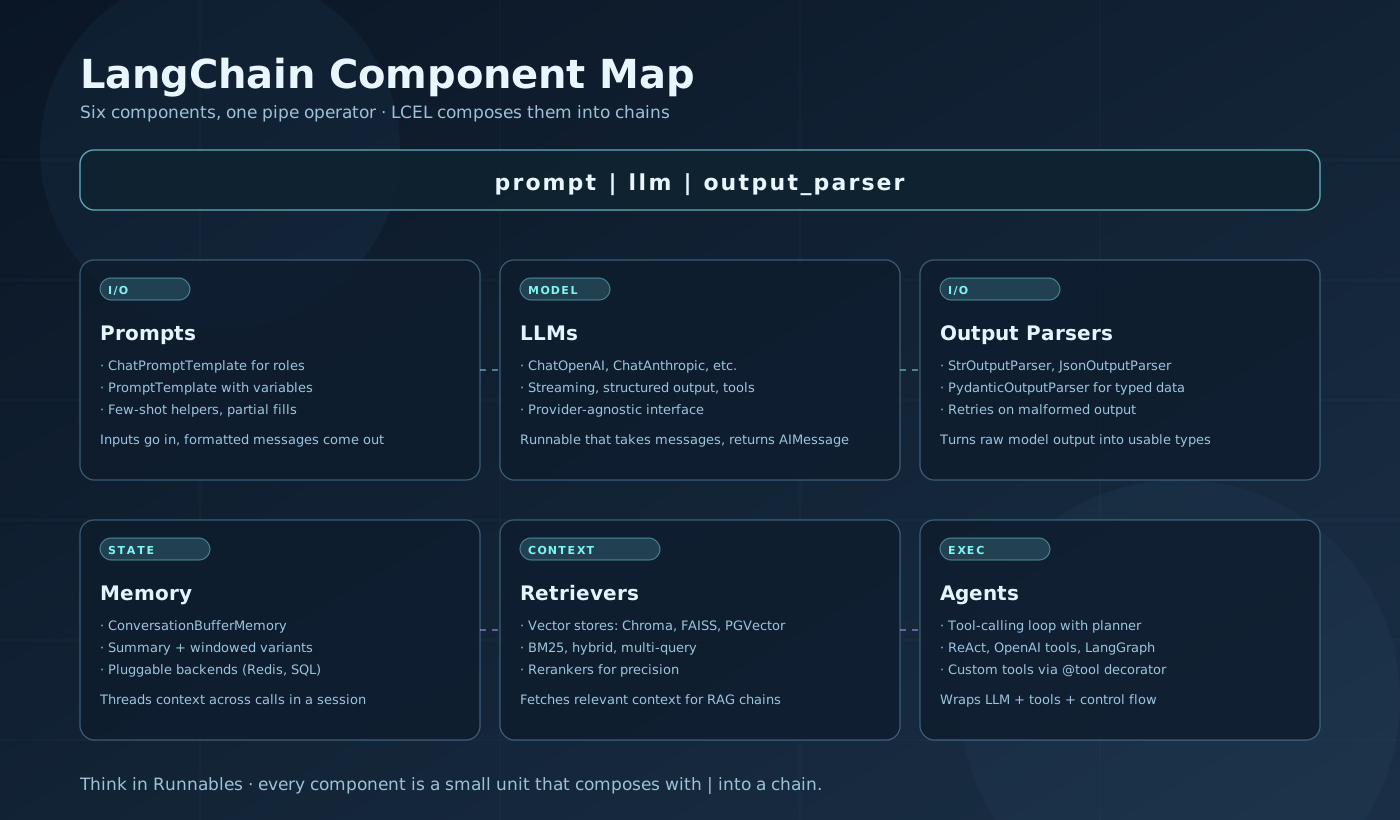
LangChain architecture at a glance. LCEL chains wire prompts, LLMs, and parsers via the | operator. Memory wraps chains to persist conversation history. Retrievers pull context from vector stores into RAG chains. Agents loop over tool calls until the task is complete.
Key Takeaways
- LCEL is the current standard. Chain everything with
|. Avoid the legacyLLMChain,SequentialChain, and.run()API — they still work but are not maintained. - Retriever quality determines RAG quality. Chunk size, overlap, embedding model, and
kmatter more than prompt wording. Tune retrieval before tuning prompts. with_structured_outputbeats manual JSON parsing. Pass a Pydantic model directly — the SDK handles format instructions and parsing. Only fall back toJsonOutputParserwhen you need fine-grained control.- Use LangGraph for anything non-trivial. Branching, cycles, multi-agent coordination, and streaming intermediate state all require LangGraph.
AgentExecutoris a dead end for complex workflows.
Related Posts
- MCP Cheatsheet: The Complete Reference for Building MCP Servers — MCP tools, resources, and transports for connecting agents to external systems.
- AI Coding Agents Cheatsheet — ReAct loops, tool schemas, sandboxing, multi-agent patterns, and evals.
- The Real Cost of AI Agents: Security, Prompt Injection, and Trust — Security model for LLM-powered tooling.
- Building the Perfect RAG Pipeline — Deep dive into retrieval quality, chunking strategy, and eval.
Missing a pattern? Drop it in the comments.