This is a reference, not a tutorial. If you want the LangChain primitives that feed into LangGraph — chains, retrievers, tools — see the LangChain Cheatsheet. If you want the broader agent patterns — sandboxing, evals, multi-agent orchestration — see the AI Coding Agents Cheatsheet.
This page is the one you keep open in a second tab while building.
Table of Contents
- Installation & Setup
- Core Concepts
- StateGraph Skeleton
- Nodes
- Edges & Conditional Routing
- State Schema
- Built-in ReAct Agent
- Persistence & Checkpointing
- Human-in-the-Loop
- Multi-Agent Patterns
- Streaming
- Common Gotchas
Installation & Setup
pip install langgraph langchain-openai langchain-anthropic
import os
os.environ["OPENAI_API_KEY"] = "sk-..."
os.environ["ANTHROPIC_API_KEY"] = "sk-ant-..."
Core Concepts
| Concept | What it is |
|---|---|
| StateGraph | The graph object. You add nodes and edges to it, then compile it into a runnable. |
| State | A typed dict that flows through the graph. Every node reads and writes to it. |
| Node | A Python function that takes state and returns a partial state update. |
| Edge | A directed connection between nodes. Can be static or conditional. |
| Conditional edge | A function that inspects state and returns the name of the next node to go to. |
END | Special terminal node. Route here to finish the graph. |
| Checkpointer | Persists state between steps. Required for memory and human-in-the-loop. |
Rule of thumb: if your agent needs branching, cycles, or state that survives across turns — use LangGraph. If it is a straight prompt-in/answer-out chain, LCEL is sufficient.
StateGraph Skeleton
The minimal working pattern — one state type, two nodes, one edge.
from typing import TypedDict
from langgraph.graph import StateGraph, END

# 1. Define state
class AgentState(TypedDict):
    input: str
    output: str

# 2. Define nodes
def process(state: AgentState) -> dict:
    return {"output": f"Processed: {state['input']}"}

def finalize(state: AgentState) -> dict:
    return {"output": state["output"].upper()}

# 3. Build graph
builder = StateGraph(AgentState)
builder.add_node("process", process)
builder.add_node("finalize", finalize)

# 4. Wire edges
builder.set_entry_point("process")
builder.add_edge("process", "finalize")
builder.add_edge("finalize", END)

# 5. Compile and run
graph = builder.compile()
result = graph.invoke({"input": "hello", "output": ""})
print(result["output"])  # "PROCESSED: HELLO"
Nodes
A node is any callable that accepts state and returns a dict of updates. Only the keys you return are merged into state — you do not return the full state object.
from langchain_openai import ChatOpenAI
from langchain_core.messages import HumanMessage

llm = ChatOpenAI(model="gpt-4o")

# Node: call an LLM
def call_llm(state: AgentState) -> dict:
    response = llm.invoke([HumanMessage(content=state["input"])])
    return {"output": response.content}

# Node: run a tool
def run_tool(state: AgentState) -> dict:
    # Do anything: call an API, run a query, write a file
    result = some_tool(state["tool_input"])
    return {"tool_result": result}

# Node: no-op passthrough (useful as a router destination)
def noop(state: AgentState) -> dict:
    return {}
Using messages list (chat history pattern)
from typing import Annotated
from langgraph.graph.message import add_messages
from langchain_core.messages import BaseMessage

class ChatState(TypedDict):
    messages: Annotated[list[BaseMessage], add_messages]

def chat_node(state: ChatState) -> dict:
    response = llm.invoke(state["messages"])
    return {"messages": [response]}  # add_messages appends, not replaces
Annotated[list[BaseMessage], add_messages]tells LangGraph to append new messages rather than overwrite the list. Drop the annotation and every node call wipes history.
Edges & Conditional Routing
Static edge
builder.add_edge("node_a", "node_b")   # always goes a → b
builder.add_edge("node_b", END)        # always terminates after b
Conditional edge
def route(state: AgentState) -> str:
    """Return the name of the next node based on state."""
    if state.get("needs_tool"):
        return "tool_node"
    return "respond"

builder.add_conditional_edges(
    "agent",            # source node
    route,              # routing function
    {                   # map return values → node names (optional but explicit)
        "tool_node": "tool_node",
        "respond": "respond",
    },
)
Route to END conditionally
def should_continue(state: AgentState) -> str:
    last_message = state["messages"][-1]
    if last_message.tool_calls:
        return "tools"
    return END   # return the END constant directly

builder.add_conditional_edges("agent", should_continue)
State Schema
TypedDict (simple)
from typing import TypedDict, Annotated
from langgraph.graph.message import add_messages
from langchain_core.messages import BaseMessage

class State(TypedDict):
    messages: Annotated[list[BaseMessage], add_messages]
    user_id: str
    iteration: int
    tool_result: str | None
Pydantic model (with validation)
from pydantic import BaseModel, Field

class State(BaseModel):
    messages: list = Field(default_factory=list)
    user_id: str = ""
    iteration: int = 0
    approved: bool = False
Custom reducer (control how values merge)
from typing import Annotated

def keep_last(existing, new):
    """Always use the newest value."""
    return new

def accumulate(existing: list, new: list) -> list:
    """Append new items to the list."""
    return existing + new

class State(TypedDict):
    results: Annotated[list[str], accumulate]   # grows across nodes
    status: Annotated[str, keep_last]           # always overwritten
Built-in ReAct Agent
For simple tool-calling loops, create_react_agent from langgraph.prebuilt is a one-liner.
from langgraph.prebuilt import create_react_agent
from langchain_openai import ChatOpenAI
from langchain_core.tools import tool

llm = ChatOpenAI(model="gpt-4o")

@tool
def multiply(a: int, b: int) -> int:
    """Multiply two integers."""
    return a * b

@tool
def add(a: int, b: int) -> int:
    """Add two integers."""
    return a + b

graph = create_react_agent(llm, tools=[multiply, add])

result = graph.invoke({
    "messages": [("human", "What is (3 * 7) + 12?")]
})
print(result["messages"][-1].content)  # "33"
With system prompt
from langchain_core.messages import SystemMessage

graph = create_react_agent(
    llm,
    tools=[multiply, add],
    state_modifier=SystemMessage(content="You are a math assistant. Show your work."),
)
Persistence & Checkpointing
Checkpointers save state after every step. Required for multi-turn conversations and human-in-the-loop.
In-memory checkpointer (development)
from langgraph.checkpoint.memory import MemorySaver

checkpointer = MemorySaver()
graph = builder.compile(checkpointer=checkpointer)

# thread_id scopes the conversation — same ID = shared history
config = {"configurable": {"thread_id": "user-42"}}

graph.invoke({"messages": [("human", "My name is Alice.")]}, config=config)
response = graph.invoke({"messages": [("human", "What is my name?")]}, config=config)
print(response["messages"][-1].content)  # "Your name is Alice."
SQLite checkpointer (persistent across restarts)
from langgraph.checkpoint.sqlite import SqliteSaver

with SqliteSaver.from_conn_string("checkpoints.db") as checkpointer:
    graph = builder.compile(checkpointer=checkpointer)
    result = graph.invoke(
        {"messages": [("human", "Hello")]},
        config={"configurable": {"thread_id": "session-1"}},
    )
Postgres checkpointer (production)
pip install langgraph-checkpoint-postgres psycopg
from langgraph.checkpoint.postgres import PostgresSaver

DB_URL = "postgresql://user:password@localhost/mydb"
with PostgresSaver.from_conn_string(DB_URL) as checkpointer:
    checkpointer.setup()   # creates tables on first run
    graph = builder.compile(checkpointer=checkpointer)
Inspect saved state
# Get current state for a thread
state = graph.get_state(config)
print(state.values)          # state dict
print(state.next)            # next node(s) to run

# Full history
for snapshot in graph.get_state_history(config):
    print(snapshot.config["configurable"]["thread_ts"], snapshot.values)
Human-in-the-Loop
Interrupt before a node
graph = builder.compile(
    checkpointer=checkpointer,
    interrupt_before=["tool_node"],   # pause before this node runs
)

# Run until interrupt
result = graph.invoke({"messages": [("human", "Delete all temp files.")]}, config=config)

# Inspect what the agent is about to do
state = graph.get_state(config)
print("About to run:", state.next)
print("Tool call:", state.values["messages"][-1].tool_calls)

# Resume (approve)
graph.invoke(None, config=config)

# Or update state before resuming (modify the tool call)
graph.update_state(config, {"messages": [...]})
graph.invoke(None, config=config)
Interrupt after a node
graph = builder.compile(
    checkpointer=checkpointer,
    interrupt_after=["agent"],   # pause after agent decides, before tools run
)
Manual interrupt from inside a node
from langgraph.errors import NodeInterrupt

def review_node(state: State) -> dict:
    if state["risk_level"] == "high":
        raise NodeInterrupt(f"High-risk action detected: {state['action']}. Awaiting approval.")
    return {}
Multi-Agent Patterns
Supervisor pattern
One supervisor LLM routes work to specialist subgraphs.
from langgraph.graph import StateGraph, END
from typing import TypedDict, Literal

class SupervisorState(TypedDict):
    messages: Annotated[list, add_messages]
    next_agent: str

def supervisor(state: SupervisorState) -> dict:
    """Decide which specialist to call next."""
    response = llm.invoke(state["messages"] + [
        HumanMessage(content="Who should handle this: 'coder', 'researcher', or 'done'?")
    ])
    return {"next_agent": response.content.strip().lower()}

def route_supervisor(state: SupervisorState) -> str:
    return state["next_agent"]   # "coder", "researcher", or "done"

def coder_agent(state: SupervisorState) -> dict:
    result = llm.invoke([HumanMessage(content=f"Write code to: {state['messages'][-1].content}")])
    return {"messages": [result]}

def researcher_agent(state: SupervisorState) -> dict:
    result = llm.invoke([HumanMessage(content=f"Research: {state['messages'][-1].content}")])
    return {"messages": [result]}

builder = StateGraph(SupervisorState)
builder.add_node("supervisor", supervisor)
builder.add_node("coder", coder_agent)
builder.add_node("researcher", researcher_agent)

builder.set_entry_point("supervisor")
builder.add_conditional_edges(
    "supervisor",
    route_supervisor,
    {"coder": "coder", "researcher": "researcher", "done": END},
)
builder.add_edge("coder", "supervisor")      # loop back after each specialist
builder.add_edge("researcher", "supervisor")

graph = builder.compile()
Subgraph composition
# Build a subgraph separately
sub_builder = StateGraph(SubState)
sub_builder.add_node("step1", step1)
sub_builder.add_node("step2", step2)
sub_builder.set_entry_point("step1")
sub_builder.add_edge("step1", "step2")
sub_builder.add_edge("step2", END)
subgraph = sub_builder.compile()

# Add the compiled subgraph as a node in the parent graph
parent_builder = StateGraph(ParentState)
parent_builder.add_node("sub", subgraph)   # subgraph is a node
parent_builder.add_node("finalize", finalize)
parent_builder.set_entry_point("sub")
parent_builder.add_edge("sub", "finalize")
parent_builder.add_edge("finalize", END)
parent_graph = parent_builder.compile()
Streaming
# Stream state updates (one dict per node that ran)
for chunk in graph.stream({"messages": [("human", "Write a haiku.")]}, config=config):
    for node_name, update in chunk.items():
        print(f"[{node_name}]", update)

# Stream LLM tokens as they are generated
for chunk in graph.stream(
    {"messages": [("human", "Explain black holes.")]},
    config=config,
    stream_mode="messages",   # yields (message_chunk, metadata) tuples
):
    message_chunk, metadata = chunk
    if hasattr(message_chunk, "content") and message_chunk.content:
        print(message_chunk.content, end="", flush=True)

# All stream modes
# "values"   — full state after each node (default)
# "updates"  — only the dict returned by each node
# "messages" — LLM token chunks as they stream
# "debug"    — everything: node start/end, checkpoints, errors
for chunk in graph.stream(input, config=config, stream_mode="updates"):
    print(chunk)
Common Gotchas
1. Returning full state from a node overwrites everything.
Nodes must return only the keys they want to update. Return {"output": "x"}, not the entire state dict. Returning the full state replaces all other keys with their defaults, silently wiping data you wanted to keep.
2. add_messages is required for chat history to accumulate.
Without Annotated[list[BaseMessage], add_messages], every node that writes messages replaces the list. Your agent will have no memory of prior turns even within a single invoke call.
3. Checkpointer is required for interrupt_before/interrupt_after.
Human-in-the-loop only works when the graph can persist and resume state. builder.compile(interrupt_before=["node"]) without a checkpointer raises at runtime. Always pair interrupts with a checkpointer.
4. graph.invoke(None, config) resumes — it does not restart.
After an interrupt, passing None as input resumes from the saved checkpoint. If you pass a new input dict instead, the graph restarts from the entry point and the interrupted state is abandoned.
5. Subgraph state schemas must be compatible with the parent. When you embed a compiled subgraph as a node, the subgraph's input/output keys must exist in the parent state. There is no automatic key mapping. Mismatched keys fail silently — the subgraph receives empty values.
6. Conditional edge routing functions must return a string, not a node object.
Return the node name as a string ("tool_node") or the END constant. Returning a node function reference, a boolean, or None produces a cryptic KeyError at runtime, not a helpful type error.
Image
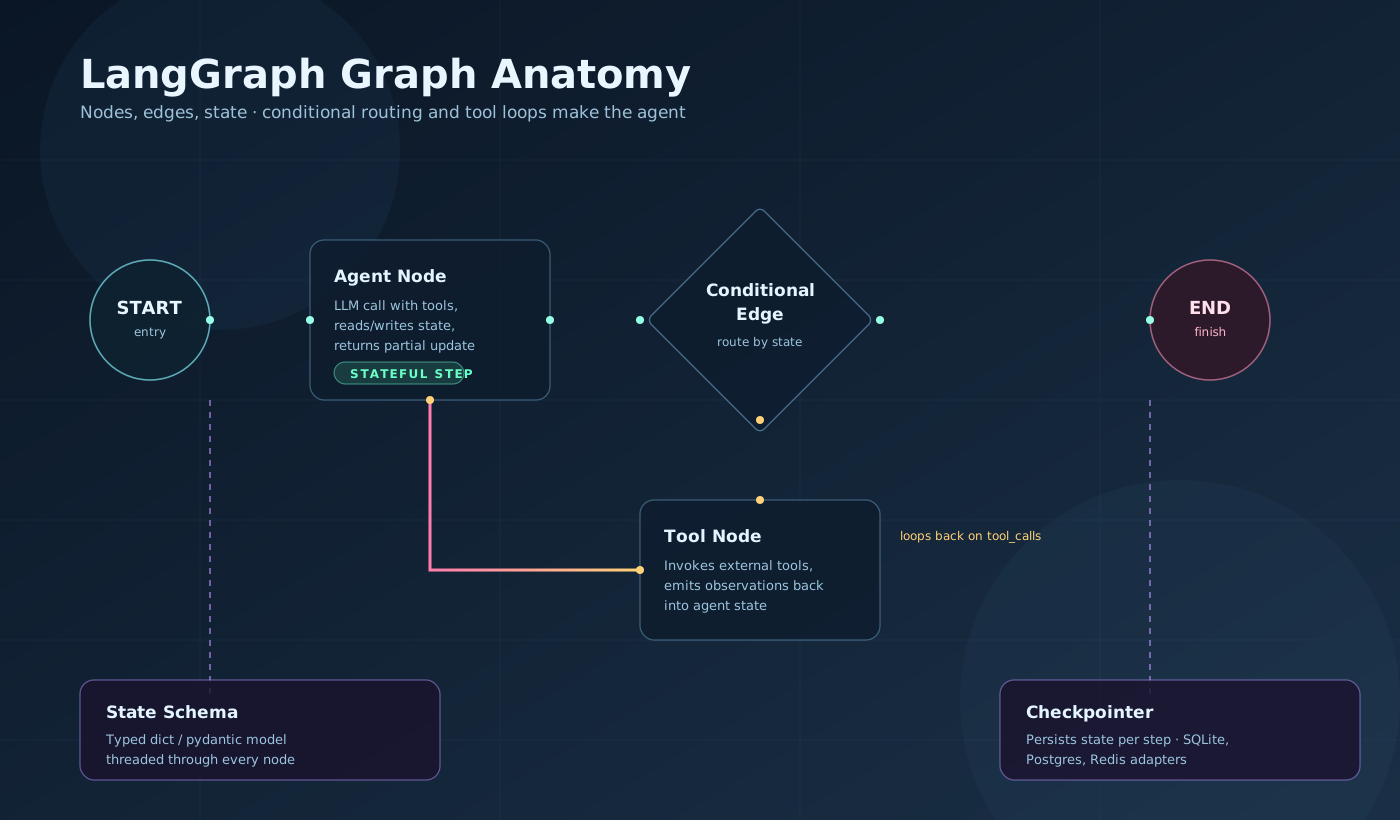
LangGraph anatomy. The StateGraph holds typed state that flows through nodes (Python functions). Static edges connect nodes unconditionally; conditional edges inspect state and route to different nodes. The checkpointer snapshots state after every step, enabling multi-turn memory and human-in-the-loop interrupts. END terminates the run.
Key Takeaways
- StateGraph + typed state is the foundation. Every node reads state in, writes a partial update out.
add_messagesis the most common reducer — use it for any chat history field. - Conditional edges are how you implement agent logic. The routing function inspects state and returns a node name. Tool call present → tool node. No tool call → END. This is the entire ReAct loop in two lines.
- Checkpointer is not optional for production. Without it: no multi-turn memory, no human-in-the-loop, no resume after failure.
MemorySaverfor dev,SqliteSaverfor single-process prod,PostgresSaverfor distributed. create_react_agentis the right starting point. Build the prebuilt first. Replace it with a custom graph only when you need branching, parallel nodes, subgraphs, or custom state.
Related Posts
- LangChain Cheatsheet — Chains, retrievers, tools, LCEL, and output parsers that feed into LangGraph.
- AI Coding Agents Cheatsheet — ReAct loops, sandboxing, evals, and multi-agent patterns using the raw Anthropic SDK.
- MCP Cheatsheet — Connecting LangGraph agents to external tools via MCP servers.
- The Real Cost of AI Agents: Security, Prompt Injection, and Trust — Security threat model for agentic systems.
Hit a gotcha not on this list? Drop it in the comments.