How Developers Actually Use AI Coding Agents in 2026
Picture the ad. A developer leans back, sips coffee, and watches an AI agent build a whole feature by itself. You've seen some version of that pitch a hundred times by now.
Here's what actually happens on a good team instead: someone writes a small, clear task. An AI tool does a chunk of the work. A person checks it. Then they do it again, in small pieces, all day long.
That's it. That's the whole story. No autopilot, no magic. Just a faster loop, run carefully.
This post walks through what that loop looks like in practice, why one well-known study found AI tools made developers slower, and why that finding is actually good news — if you use it right.
The three tools most developers now use together
By 2026, most professional developers aren't using one AI tool. They're using three, stacked together, each doing a different job.
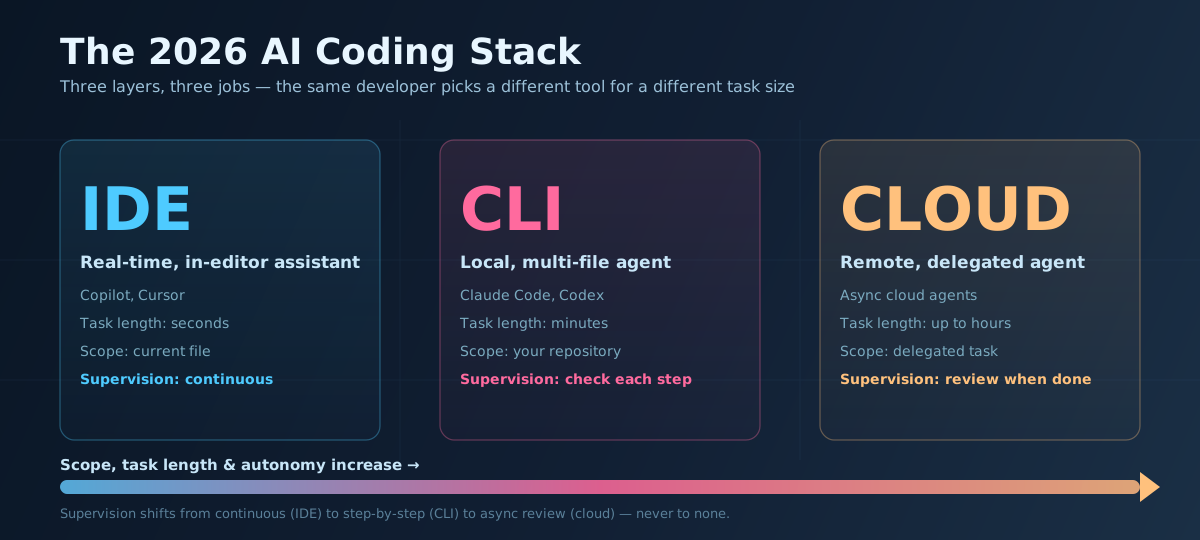 Three layers, three jobs — pick the tool that matches the size of the task, not the one with the flashiest demo.
- The IDE assistant. This lives inside your code editor. ("IDE" just means "integrated development environment" — the app where you write code, like VS Code.) It suggests the next few lines as you type or answers a quick question about the file you have open. Copilot and Cursor do this well. It's fast, cheap, and never leaves your side.
- The CLI agent. "CLI" means "command line interface" — the plain text window where you type commands instead of clicking buttons. A CLI agent, like Claude Code or Codex, runs on your own machine. You give it a task, and it reads your project, edits several files, runs your tests, and fixes what breaks — checking its own work in a loop, sometimes for several minutes straight before it hands control back to you.
- The cloud agent. This one runs somewhere else entirely, on a remote server instead of your laptop. You hand it a bigger job — "upgrade this library across the whole repo" — and walk away. It might work for an hour on its own. You come back later and review what it did.
None of the three replaces the other two. A one-line suggestion doesn't need a CLI agent spinning up a full test run. A multi-hour migration isn't something you want to babysit keystroke by keystroke in your editor. Developers pick the layer that matches the size of the job, the same way you'd pick a screwdriver over a power drill depending on the screw.
If you want the mechanics of how that CLI-agent layer actually finds its way around a large project — without just dumping your entire codebase into the model — Repo-Level AI Agents explains it in plain terms.
The study that says AI makes you slower
Here's the finding that lit up every developer group chat this year. METR — a nonprofit that runs careful, controlled studies on AI systems — ran what's called a randomized controlled trial. That just means they took real, experienced open-source developers, split them into two groups by chance, gave one group AI tools and the other none, and timed how long real tasks actually took.
The AI group was 19% slower.
Not faster. Slower. On real tasks. Done by skilled people. Using real AI tools.
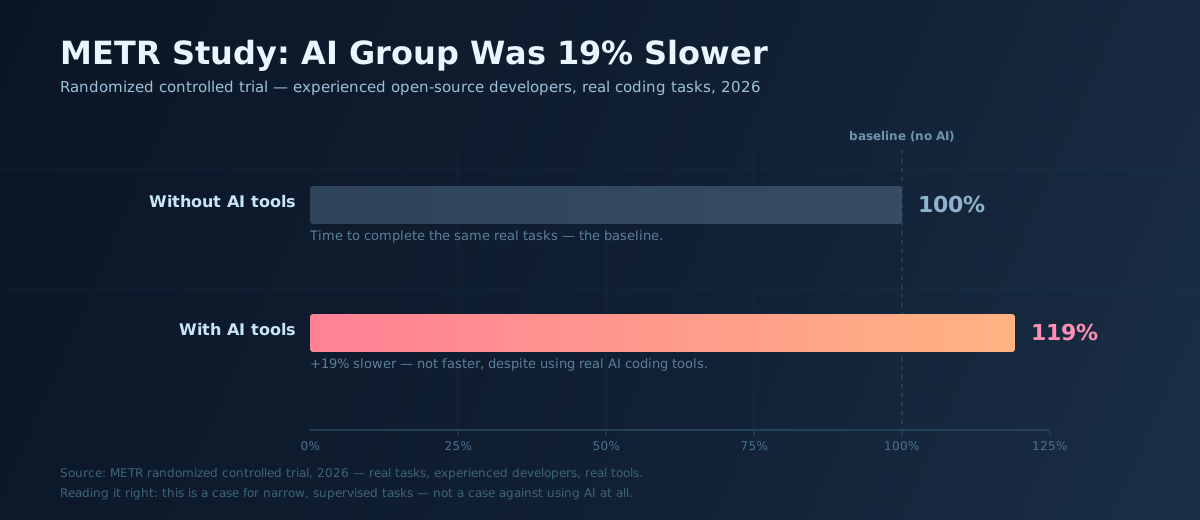 The AI group didn't just fail to gain time — they lost 19% of it, on the same real tasks.
That number gets quoted constantly, usually to argue AI coding tools are overhyped. I'd argue it says something different: it's a case for using these tools on purpose, not for throwing them out.
Think about what "using AI" meant for the average developer in that study. Probably something like: ask a question, get an answer, paste it in, run the code, find it's subtly wrong, ask again, tweak the wording, try again. Every one of those loops costs real time. If you don't manage the loop, the loop manages you.
The developers actually seeing gains treat the tool differently. They hand it a narrow, well-defined task. They check the output the way they'd check a junior teammate's pull request — not word by word, but for the parts that matter. And they stop the moment it drifts off track, instead of coaxing a wrong answer through five more tries. For a wider look at where AI's real, measured gains show up and where the hype outruns the data, The Skeptic's Reality Check covers similar ground beyond just coding.
What "net productivity" actually means
Productive developers in 2026 have mostly stopped asking "did AI help with this one moment?" Instead they ask: "across my whole week, am I shipping more, with fewer mistakes?"
That's called optimizing for net productivity — the total effect across the whole workflow, not just the flashy part. It leads to some surprising choices. Some developers have quietly turned off their IDE autocomplete assistant entirely, with no drop in output, because a constant stream of suggestions was breaking their concentration more than it was saving keystrokes. The win wasn't adding a tool. It was removing one that wasn't earning its keep.
That's the same logic behind Agent Reliability Blueprint: an agent that runs unsupervised and occasionally causes one expensive mistake is not a productivity win, no matter how impressive it looks in a demo. You have to measure the whole system, cleanup cost included, not just the exciting part.
Cost and tokens are now part of the job
There's a second reason developers are getting more deliberate: money and limits.
Every request to an AI model costs "tokens" — small chunks of text, roughly a few letters each, that the model reads and writes. More tokens means more cost and more time waiting. Earlier in 2026, plenty of developers ran into Anthropic's usage rate limits mid-task, right in the middle of real work — a blunt reminder that these tools are not an unlimited resource you can throw at every problem.
That's pushed some habits that look a lot like good engineering habits in general:
- Write a clear, specific task instead of a vague one, so the model isn't guessing what you meant.
- Hand the model only the files and context it actually needs, not the whole repository, so it isn't wading through noise.
- Aim for a strong first attempt instead of relying on a string of retries to eventually get there.
None of that is exciting to write about. It's also exactly what separates the developers getting real value from the ones generating the next "AI is overhyped" headline.
The real 2026 workflow, in one sentence
Strip away the marketing and here's what's actually happening: a human breaks a big job into small, bounded pieces, hands each piece to the right layer of the AI stack, and stays in the loop to check the work — instead of asking one AI agent to run the whole show unsupervised.
That's less exciting than "AI writes your app while you sleep." It's also the version that actually ships working software.
Key Takeaways
- The 2026 standard AI coding setup has three layers: an IDE assistant for quick in-editor help, a CLI agent for local multi-file work, and a cloud agent for larger tasks you delegate and check on later.
- A METR randomized controlled trial found experienced developers were 19% slower using AI tools — a sign of undisciplined use, not proof the tools don't work.
- Productive developers measure "net productivity" across their whole workflow, not single flashy moments — some have dropped tools like autocomplete entirely with no loss in output.
- Token cost and rate limits are now a real engineering constraint. Strong first attempts and tight context beat trial-and-error retries.
- The winning pattern is a human supervising several small, bounded AI tasks — not one agent running the whole job unsupervised.
Related Posts
- Repo-Level AI Agents: How Coding Assistants Learned to Reason Across a Whole Codebase — How the CLI-agent layer actually searches and reasons across your project, explained simply.
- Agent Reliability Blueprint — The guardrails and architecture behind agents that are safe to run with less supervision.
- The Skeptic's Reality Check: What AI Is Actually Delivering in 2026 — Where AI's measured productivity gains are real, and where the hype gets ahead of the data.
- Why Would I Choose Claude Code? — A closer look at one of the CLI agents mentioned above.
- Why Would I Choose Codex? — OpenAI's terminal-native agent, and how it compares.